Author: mumariqbal191@gmail.com

  • How to Download a Tax Clearance Certificate for Freelance Visa (Pakistan 2026 Guide)

    How to Download a Tax Clearance Certificate for Freelance Visa (Pakistan 2026 Guide)

    Meta Description: Learn how to download a tax clearance certificate for freelance visa in Pakistan 2026 with this step-by-step FBR guide.

    Introduction

    If you’re planning to apply for a freelance or digital nomad visa abroad, one document you simply can’t ignore is the Tax Clearance Certificate (TCC).

    Understanding how to download a tax clearance certificate for freelance visa in Pakistan is critical—especially in the 2025–2026 tax year, where embassies and immigration departments are getting stricter about financial proof.

    Look, I get it, taxes are boring but this one document can literally decide whether your visa gets approved or rejected.

    Here is the real talk: if your tax record is clean and you’ve filed properly with the Federal Board of Revenue (FBR), getting your TCC is actually quite simple.

    This guide by gigtax.site will walk you through everything step by step.

    What is a Tax Clearance Certificate (TCC)?

    A Tax Clearance Certificate (TCC) is an official document issued by FBR confirming that:

    • You have filed your tax returns
    • You have no outstanding tax liabilities
    • You are a compliant taxpayer

    For freelancers, this is often required when applying for:

    • Freelance visas (UAE, Germany, Portugal, etc.)
    • Residency permits
    • International bank verifications

    Think of it as your “financial character certificate.”
    Why Freelancers Need TCC for Visa Applications

    If you’re earning through Upwork, Fiverr, or direct clients, embassies want proof that:

    • Your income is legitimate
    • You pay taxes in your home country
    • You are financially stable

    Without a TCC, your application may be questioned or delayed.

    If your not a filer, getting this certificate becomes nearly impossible.

    Eligibility Criteria for Tax Clearance Certificate (2025-2026)

    Before applying, make sure you meet these conditions:

    Basic Requirements:

    • Registered with FBR (NTN holder)
    • Filed latest income tax return (2025-2026)
    • No outstanding tax dues
    • Active Taxpayer List (ATL) status

    If any of these are missing, your application may be rejected.

    TCC vs ATL: What’s the Difference?

    Many freelancers confuse these two.

    Comparison Table

    FeatureTax Clearance Certificate (TCC)ATL Status
    PurposeProof of no tax liabilityProof of filer status
    Issued ByFBR (on request)Automatic after filing
    Required ForVisa, immigrationTax benefits
    ValidityTemporaryAnnual
    Application NeededYesNo

    Both are important, but TCC is specifically required for visa purposes.

    Documents Required for TCC Application

    Keep these ready before applying:

    • CNIC
    • NTN
    • Latest tax return acknowledgment
    • Bank statements (optional but helpful)
    • Proof of freelance income

    Having these ready makes the proccess smoother.

    Step-by-Step: How to Download a Tax Clearance Certificate for Freelance Visa

    Alright, let’s go step by step.

    Step 1: Log in to FBR IRIS Portal

    • Visit IRIS portal
    • Enter CNIC and password

    This is your main dashboard.

    Step 2: Ensure Your Tax Filing is Complete

    Before applying:

    • File your latest return
    • Pay any outstanding tax

    Without this, TCC request won’t go through.

    Step 3: Create TCC Request

    • Go to “Applications & Requests”
    • Select “Tax Clearance Certificate”
    • Choose purpose → “Visa / Immigration”

    Make sure you select the correct purpose.

    Step 4: Fill Required Details

    • Mention destination country
    • Provide reason (freelance visa application)
    • Attach supporting documents if required

    Keep your information accurate.

    Step 5: Submit Application

    • Review your details
    • Submit request

    After submission, your application goes to FBR officer for review.

    Step 6: Track Application Status

    • Check status in IRIS
    • Respond to any queries from FBR

    Sometimes they may ask for additional documents.

    Step 7: Download Your TCC

    Once approved:

    • Go to “Completed Applications”
    • Download your Tax Clearance Certificate

    Congrats, your ready for visa submission.

    How Long Does It Take?

    Typically:

    • Processing Time: 3 to 10 working days

    However:

    • If your record is clean → faster
    • If issues exist → delays possible

    So always prepare in advance.

    Common Reasons for TCC Rejection

    Let’s avoid the mistakes most freelancers make.

    1. Not Filing Latest Tax Return

    This is the biggest issue.

    2. Outstanding Tax Liability

    Even small unpaid amounts can block approval.

    3. Incomplete Profile on IRIS

    Missing bank or income details can cause delays.

    4. Mismatch in Income Records

    Declared income must match bank inflows.

    5. Incorrect Application Details

    Wrong visa purpose or country info can lead to rejection.

    Tips to Get TCC Approved Quickly

    Here’s some big brother advice.

    • File taxes early (don’t wait for deadline)
    • Keep your income records clean
    • Maintain ATL status
    • Respond quickly to FBR queries
    • Avoid last-minute applications

    This is not something you want to rush.

    Real Example: Freelancer Applying for UAE Visa

    Let’s say:

    • Freelancer earns via Upwork
    • Files tax under IT export
    • Appears in ATL

    When applying for UAE freelance visa:

    • Submits TCC
    • Shows clean financial record

    Result → Smooth visa approval process.

    Without TCC? Delays or rejection risk increases.

    Benefits of Having a Tax Clearance Certificate

    • Strong visa application
    • Proof of legal income
    • Better financial credibility
    • Peace of mind

    It shows you are a responsible professional—not just earning, but managing money properly.

    How gigtax.site Helps Freelancers

    At gigtax.site, we help freelancers:

    • File income tax returns
    • Fix record discrepancies
    • Apply for Tax Clearance Certificate
    • Prepare financial documents for visa

    We understand both FBR requirements and international visa expectations.

    So you don’t have to figure everything out alone.

    Final Thoughts

    Understanding how to download a tax clearance certificate for freelance visa is a must in 2026 for any serious freelancer in Pakistan.

    Look, I get it, dealing with FBR can feel overwhelming at first. But once your records are clean, the process becomes straightforward.

    Don’t wait until your visa deadline is near.

    Prepare early, file correctly, and stay compliant.

    Call to Action

    Don’t let paperwork delay your international opportunities.

    Become a tax filer, secure your position in the ATL, and get your Tax Clearance Certificate without stress.

    Visit gigtax.site today and get expert help to manage your taxes, prepare your documents, and confidently apply for your freelance visa.


  • Difference Between 0.25% and 1% Tax Rate for IT Exporters (Pakistan 2026 Guide)

    Difference Between 0.25% and 1% Tax Rate for IT Exporters (Pakistan 2026 Guide)

    Meta Description: Learn the difference between 0.25% and 1% tax rate for IT exporters in Pakistan 2026 and how to qualify for lower tax legally.

    Introduction

    If you’re a freelancer or IT exporter in Pakistan, understanding the difference between 0.25% and 1% tax rate for IT exporters can literally save you thousands—sometimes even lakhs—of rupees every year.

    Look, I get it, taxes are boring but this one detail? It actually matters a lot.

    Here is the real talk: both 0.25% and 1% are part of Pakistan’s Final Tax Regime (FTR) for IT exports, but not everyone qualifies for the lower 0.25% rate.

    In this guide by gigtax.site, I’ll break down exactly:

    • Who qualifies for 0.25%
    • Who ends up paying 1%
    • How to legally optimize your tax position

    Let’s make this simple.

    What is the IT Export Tax Regime in Pakistan (2025-2026)?

    Pakistan promotes IT exports by offering extremely low tax rates under FTR.

    Key Highlights:

    • Applies to freelancers and IT companies exporting services
    • Income must come through proper banking channels
    • Tax is considered final (no further tax liability)
    • Rates: 0.25% or 1% depending on compliance

    If you don’t qualify for this regime, your income may be taxed up to 35%.

    Difference Between 0.25% and 1% Tax Rate for IT Exporters

    Let’s get straight to the point.

    Comparison Table

    Feature0.25% Tax Rate1% Tax Rate
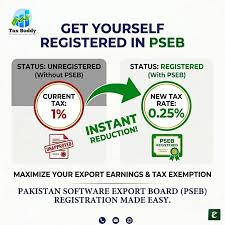
    EligibilityRegistered with PSEBNot registered with PSEB
    Compliance LevelHighBasic
    Tax SavingsMaximumModerate
    Applicable ToIT companies & some freelancersMost freelancers
    DocumentationMore detailedMinimal
    Government IncentiveYes (special rate)Standard export rate

    So the main difference comes down to one thing:

    👉 PSEB Registration (Pakistan Software Export Board)

    What is PSEB and Why It Matters?

    The Pakistan Software Export Board (PSEB) is a government body that regulates and promotes IT exports.

    If you’re registered with PSEB:

    • You may qualify for 0.25% tax rate
    • You gain credibility as an IT exporter
    • You may access additional incentives

    Without PSEB registration, most freelancers fall into the 1% category.

    Who Qualifies for 0.25% Tax Rate?

    To get the lowest rate, you typically need:

    Requirements:

    • Registered with PSEB
    • Operating as a formal IT business or company
    • Proper documentation of export income
    • Income received via banking channels

    Freelancers can qualify, but it’s less common unless they formalize their setup.

    Who Pays 1% Tax Rate?

    Most freelancers fall here.

    Typical Cases:

    • Individual freelancers (Fiverr, Upwork, etc.)
    • Not registered with PSEB
    • Receiving foreign remittances properly

    And honestly, 1% is still extremely low compared to global tax rates.

    So if your paying 1%, your still in a very good position.

    Example: 0.25% vs 1% Tax Difference

    Let’s make this practical.

    Example Income:

    • Annual Income: 5,000,000 PKR
    Tax RateTax Payable
    0.25%12,500 PKR
    1%50,000 PKR

    Difference = 37,500 PKR saved

    Now imagine this over multiple years.

    Step-by-Step: How to Qualify for 0.25% Tax Rate

    Alright, if you want to level up and reduce your tax, follow this proccess.

    Step 1: Register Your Business

    • Create a sole proprietorship or company
    • Get NTN from FBR

    Step 2: Apply for PSEB Registration

    • Visit PSEB portal
    • Submit business details
    • Provide proof of IT services

    Step 3: Maintain Proper Documentation

    • Export invoices
    • Bank remittance records
    • Client contracts (if available)

    Step 4: File Tax Return Correctly

    • Declare income as IT export services
    • Ensure FTR is applied

    Step 5: Stay Compliant

    • Renew PSEB registration if required
    • Keep records updated

    This is where many freelancers drop off—they start but don’t stay consistent.

    Is It Worth Going from 1% to 0.25%?

    Here’s the honest answer.

    Yes, if:

    • You earn high income (above 2–3 million PKR annually)
    • You plan long-term freelancing or agency work
    • You want a professional business structure

    Maybe not, if:

    • You’re just starting
    • Your income is small
    • You prefer simplicity

    Look, I get it, not everyone wants extra paperwork.

    But if your scaling, it’s worth considering.

    Common Mistakes Freelancers Make

    Let’s avoid costly errors.

    1. Thinking 0.25% is Automatic

    It’s not. You must qualify for it.

    2. Ignoring PSEB Registration

    This is the biggest gap.

    3. Filing Under Wrong Category

    Wrong selection = higher tax.

    4. Not Using Banking Channels

    Cash or informal transfers disqualify you.

    5. Not Filing at All

    This removes you from FTR entirely.

    How FBR Verifies Your Tax Rate

    FBR cross-checks:

    • Bank inflows
    • Declared income
    • Business registration
    • PSEB status (if applicable)

    So don’t try shortcuts. They usually backfire.

    Benefits of Staying in the IT Export Tax Regime

    Whether 0.25% or 1%, you still get:

    • Extremely low tax rates
    • Simplified filing
    • No complex audits (in most cases)
    • Legal protection for your income

    Compared to normal salaried individuals, this is a huge advantage.

    How gigtax.site Helps You Optimize Tax

    At gigtax.site, we specialize in helping freelancers and IT exporters:

    • Understand tax categories
    • Register with PSEB
    • File tax returns correctly
    • Optimize tax from 1% to 0.25% where possible

    We don’t just file your taxes—we help you build a smarter financial structure.

    Final Thoughts

    Understanding the difference between 0.25% and 1% tax rate for IT exporters is one of the most important things for freelancers in Pakistan right now.

    Here is the real talk: both rates are excellent, but if you can legally qualify for 0.25%, it’s worth exploring.

    Don’t overcomplicate it though.

    Start with proper registration, clean income records, and correct tax filing.

    Everything else builds from there.

    Call to Action

    Don’t leave money on the table.

    Become a tax filer, get into the ATL, and optimize your tax the smart way.

    Visit gigtax.site today and get expert guidance tailored for Pakistani freelancers so your income stays protected, compliant, and maximized.

  • Step-by-Step Guide to Filing FBR Income Tax for Upwork Earners (Pakistan 2026)

    Step-by-Step Guide to Filing FBR Income Tax for Upwork Earners (Pakistan 2026)

    Meta Description: Learn the step-by-step guide to filing FBR income tax for Upwork earners in Pakistan 2026 and stay compliant with ease.

    Introduction

    If you’re earning through Upwork in Pakistan, understanding the step-by-step guide to filing FBR income tax for Upwork earners is no longer optional—it’s essential for your financial safety.

    Look, I get it, taxes are boring but ignoring them in 2026 can create serious issues, especially with increased scrutiny by the Federal Board of Revenue (FBR) on foreign remittances.

    Here is the real talk: filing your tax as an Upwork earner is actually simple once you understand the system. And the best part? You may only pay 0.25% to 1% tax if structured correctly.

    This complete guide by gigtax.site will walk you through everything step by step.

    Who Are Considered Upwork Earners in Pakistan?

    Upwork earners include freelancers receiving payments from international clients via:

    • Upwork direct contracts
    • Hourly or fixed-price projects
    • Payments transferred through Payoneer or direct bank

    If your income is coming into Pakistan through official banking channels, it is categorized as export of IT services.

    That’s good news, because export income gets tax benefits.

    Tax Rules for Upwork Earners (2025-2026)

    Pakistan’s tax system encourages freelancers.

    Key Rules You Must Know:

    • IT export income is taxed under Final Tax Regime (FTR)
    • Tax rate ranges from 0.25% to 1%
    • Must receive income through proper banking channels
    • Must file annual income tax return
    • Must register with FBR (NTN required)

    If you skip filing, your income may fall under normal tax slabs—which go up to 35%. Not fun.

    Final Tax Regime vs Normal Tax Regime

    Comparison Table

    FeatureFinal Tax Regime (FTR)Normal Tax Regime
    Tax Rate0.25% – 1%Up to 35%
    ComplexitySimpleComplex
    Record KeepingMinimalDetailed
    Best ForUpwork FreelancersLocal Businesses
    Audit RiskLowHigher

    Always aim to qualify for FTR—this is where freelancers save the most money.

    Documents Required Before Filing

    Before you begin, keep these ready:

    • CNIC
    • NTN (National Tax Number)
    • Upwork earning history
    • Payoneer/Wise statements
    • Bank account details
    • Internet/electricity bills (optional for expense proof)

    Don’t worry, you don’t need advanced accounting. Just basic records.

    Step-by-Step Guide to Filing FBR Income Tax for Upwork Earners

    Alright, let’s break down the exact proccess.

    Step 1: Register on FBR IRIS Portal

    • Visit IRIS portal
    • Click “Registration for Unregistered Person”
    • Create your account
    • Get your NTN

    If you already have NTN, skip this step.

    Step 2: Log into Your IRIS Account

    • Enter CNIC and password
    • Access your taxpayer dashboard

    This is where everything happens.

    Step 3: Open Income Tax Return Form

    • Select “Income Tax Return”
    • Choose tax year 2025-2026

    Make sure you pick the correct year.

    Step 4: Declare Your Income

    This is the most important part.

    Under income section:

    • Select “Foreign Income / IT Export Services”
    • Enter total Upwork earnings for the year

    Use your Upwork reports or Payoneer statements as reference.

    Step 5: Apply Final Tax Regime

    Ensure your income is declared under:

    • Export of Services

    This ensures you get the reduced tax rate.

    If you select wrong category, your tax calculater will shoot up drastically.

    Step 6: Declare Bank Accounts

    • Add your bank account
    • Mention remittance details

    FBR cross-checks this data, so keep it accurate.

    Step 7: Declare Expenses (Optional)

    You can include:

    • Internet bills
    • Software subscriptions
    • Workspace expenses

    Not mandatory under FTR, but still useful.

    Step 8: Wealth Statement

    This part confuses most freelancers.

    You need to declare:

    • Assets (bank balance, cash)
    • Liabilities (if any)

    Basically, explain how your income changed your financial position.

    Step 9: Review and Submit

    • Double-check all entries
    • Submit return

    Once submitted, you’re officially compliant.

    How Much Tax Do Upwork Earners Pay?

    Let’s simplify with an example.

    Example:

    • Annual Income: 2,000,000 PKR
    • Tax Rate (FTR): 1%

    Tax Payable = 20,000 PKR

    Now compare that with normal tax slab:

    • Could go up to 250,000+ PKR

    Huge difference.

    Common Mistakes Upwork Freelancers Make

    Let me save you from real headaches.

    1. Not Filing Tax Returns

    Even if tax is deducted, filing is mandatory.

    2. Selecting Wrong Income Category

    This is the #1 mistake.

    3. Ignoring Wealth Statement

    Many freelancers skip this and get notices.

    4. Mixing Personal and Business Income

    Keep things clean.

    5. Filing Late

    Late filing removes you from ATL.

    Benefits of Filing Tax for Upwork Income

    Here’s why it’s worth it:

    • Lower taxes (0.25%–1%)
    • Smooth banking transactions
    • No fear of FBR notices
    • Eligibility for ATL
    • Easier visa and financial documentation

    If your serious about freelancing, tax compliance is part of the game.

    ATL (Active Taxpayer List) – Why It Matters

    Once you file your return:

    • Your name appears in ATL
    • You get reduced withholding taxes
    • Your financial credibility improves

    Non-filers pay double taxes in many cases.

    How gigtax.site Helps Upwork Earners

    At gigtax.site, we specialize in freelancers like you.

    We help with:

    • NTN registration
    • Income tax filing
    • Wealth statement preparation
    • Tax planning for IT exports

    We understand how Upwork payments work, so you don’t have to figure it out alone.

    Final Thoughts

    The step-by-step guide to filing FBR income tax for Upwork earners may seem overwhelming at first, but once you go through it, it becomes routine.

    Look, I get it, nobody enjoys dealing with taxes. But ignoring them is a costly mistake.

    Start simple. Register. File. Stay consistent.

    Your future self will thank you.

    Call to Action

    Don’t wait for problems to appear.

    Become a tax filer, secure your place in the ATL, and take control of your freelance income today.

    Visit gigtax.site now to get expert help and make sure your Upwork earnings stay safe, legal, and optimized for growth.

  • How to Register for NTN as a Freelancer in Pakistan 2026 (Complete FBR Guide)

    How to Register for NTN as a Freelancer in Pakistan 2026 (Complete FBR Guide)

    Meta Description: Learn how to register for NTN as a freelancer in Pakistan 2026 with this step-by-step FBR guide for tax filing and compliance.

    Introduction

    If you’re earning online through freelancing platforms or international clients, the first serious step toward financial legitimacy is learning how to register for NTN as a freelancer in Pakistan 2026.

    Look, I get it, taxes are boring but avoiding them in 2026 is not a smart move—especially with the Federal Board of Revenue (FBR) tightening compliance checks on digital income.

    Here is the real talk: getting your NTN (National Tax Number) is not complicated, and once you have it, you unlock lower taxes, smoother banking, and zero stress when large payments hit your account.

    This guide by gigtax.site will walk you through everything in a simple, practical way.

    What is NTN and Why Freelancers Need It?

    Understanding NTN in Pakistan

    NTN (National Tax Number) is your unique identification number issued by FBR when you register as a taxpayer.

    For freelancers, it means:

    • You are officially recognized by FBR
    • You can file income tax returns
    • You qualify for Active Taxpayer List (ATL)

    Without NTN, your income may be treated as undocumented, which can cause serious issues.

    Why NTN is Mandatory for Freelancers in 2026

    With the growth of Pakistan’s freelance economy, FBR now closely monitors foreign remittances.

    If you’re receiving payments via:

    • Payoneer
    • Wise
    • Direct bank transfer

    Then yes, you need NTN.

    Otherwise, your account activity may trigger compliance notices.

    Freelancer vs Non-Filer: What’s the Difference?

    Here’s a simple comparison to understand why NTN matters.

    Comparison Table

    FeatureFreelancer with NTN (Filer)Without NTN (Non-Filer)
    Legal StatusRegistered with FBRUnregistered
    Tax Rate0.25% – 1% (IT exports)Up to 35%
    Bank TransactionsSmoothHigh scrutiny
    ATL StatusIncludedNot included
    Property PurchaseEasierExpensive (higher tax)

    If your serious about freelancing long-term, staying non-filer is just not worth it.

    Who Should Register for NTN?

    You should register if you are:

    • A Fiverr, Upwork, or Freelancer.com seller
    • A remote employee working for foreign clients
    • A digital service provider (developer, designer, writer)
    • An Amazon VA or eCommerce consultant

    Even if your income is small right now, start early. Trust me, it saves headaches later.

    Documents Required for NTN Registration

    Before starting the process, keep these ready:

    • Valid CNIC
    • Active mobile number (registered on your CNIC)
    • Email address
    • Bank account details
    • Utility bill (for address verification)

    That’s it. No complex paperwork.

    Step-by-Step: How to Register for NTN as a Freelancer in Pakistan 2026

    Alright, let’s break this down into simple steps.

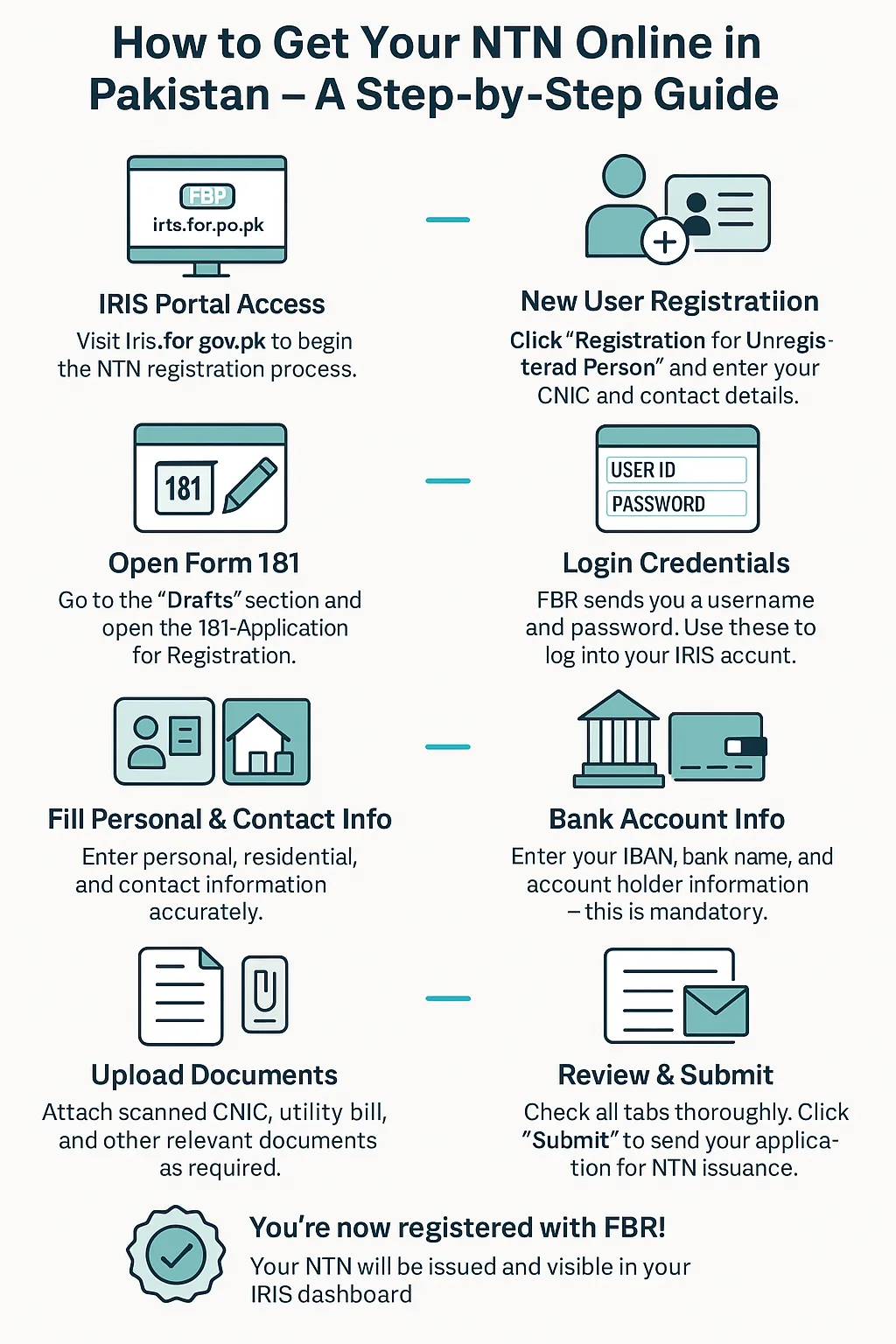
    Step 1: Visit FBR IRIS Portal

    Go to the official FBR IRIS system.

    Click on “Registration for Unregistered Person.”

    Step 2: Create Your Account

    • Enter CNIC number
    • Add mobile number and email
    • Receive verification codes

    Make sure your details are correct—this is important.

    Step 3: Fill the Registration Form

    You will see Form 181.

    Enter:

    • Personal details
    • Business type → Select “Freelancer / IT Export Services”
    • Income source

    This step is where many people mess up, so take your time.

    Step 4: Provide Business Details

    Even if you’re working from home:

    • Use your residential address
    • Mention nature of work (e.g., “Software Development Services”)

    Step 5: Link Your Bank Account

    Add your bank account used for freelancing income.

    This helps FBR track your foreign remittances properly.

    Step 6: Submit Application

    Once everything is filled:

    • Review carefully
    • Submit the form

    Your NTN is usually issued within a few hours or 1–2 days.

    Congrats, your now officially part of Pakistan’s tax system.

    What Happens After NTN Registration?

    Getting NTN is just the beginning.

    Next Steps:

    • File your annual tax return
    • Declare your freelance income
    • Maintain basic transaction records
    • Ensure your name appears in ATL

    Many freelancers stop after NTN, which is a mistake.

    Tax Benefits for Registered Freelancers

    Pakistan offers strong incentives for IT exports.

    Key Benefits:

    • Low tax rate (0.25% – 1%)
    • No complex audit requirements (if properly declared)
    • Smooth foreign remittance inflows
    • Recognition as a legal taxpayer

    This is why smart freelancers register early.

    Common Mistakes to Avoid

    Let me save you from some real-world mistakes.

    1. Choosing Wrong Business Category

    If you don’t select IT export, your tax may jump to 35%.

    2. Not Linking Bank Account

    Unlinked accounts can cause discrepancies.

    3. Ignoring Tax Filing After NTN

    NTN alone is useless without filing returns.

    4. Providing Incorrect Information

    Even small errors can delay approval.

    5. Delaying Registration

    The longer you wait, the more complicated things get.

    NTN vs STRN: Do Freelancers Need Both?

    Good question.

    • NTN = Income Tax registration
    • STRN = Sales Tax registration

    For Freelancers:

    • NTN → Required
    • STRN → Usually not required for IT exports

    Unless you’re selling locally or dealing with goods, NTN is enough.

    How gigtax.site Helps Freelancers

    At gigtax.site, we specialize in helping Pakistani freelancers navigate tax complexities.

    We provide:

    • NTN registration assistance
    • Income tax filing
    • ATL activation
    • Personalized tax planning

    We understand freelancing income structures, which typical accountants often don’t.

    Final Thoughts

    Learning how to register for NTN as a freelancer in Pakistan 2026 is one of the smartest financial moves you can make.

    Look, I get it, the process might feel confusing at first. But once you go through it, you’ll realize it’s actually quite simple.

    The biggest problem is overthinking it.

    Start now, stay consistent, and keep your records clean. Your future self will thank you.

    Call to Action

    Don’t wait until FBR sends you a notice.

    Register for your NTN today, become a tax filer, and get listed in the ATL to enjoy lower taxes and financial peace of mind.

    Visit gigtax.site now and get expert help to handle your NTN registration, tax filing, and freelancing finances the right way.

  • Sales tax on services: Do freelancers need to register with PRA/SRB?

    Sales tax on services: Do freelancers need to register with PRA/SRB?

    If you’re a freelancer in Pakistan earning from Fiverr, Upwork, direct clients, or even local businesses, you’ve probably heard this scary term: sales tax on services.

    And then comes the confusion…

    “Do I need to register with PRA?”
    “SRB is for Sindh, right?”
    “What if I only work online with foreign clients?”

    Look, I get it, taxes are boring but this one mistake can actually cost you penalties or unnecessary compliance headaches if ignored.

    So here is the real talk for Pakistan Tax Year 2025-2026, explained in a way that actually makes sense

    What is Sales Tax on Services in Pakistan?

    In Pakistan, sales tax on services is NOT controlled by FBR directly.

    Instead, it is handled by provincial authorities:

    • PRA (Punjab Revenue Authority) – Punjab
    • SRB (Sindh Revenue Board) – Sindh
    • KPRA (Khyber Pakhtunkhwa Revenue Authority) – KP
    • BRA (Balochistan Revenue Authority) – Balochistan

    This means if you provide taxable services within Pakistan, your registration depends on where you operate.

    But freelancers usually operate online… so things get interesting.

    The Big Question: Do Freelancers Need PRA/SRB Registration?

    Here is the simple answer:

    ❌ If you only earn from foreign clients (export services):

    Most freelancers do NOT need PRA/SRB registration.

    ⚠️ If you provide services to local Pakistani clients:

    You MAY need provincial sales tax registration depending on your income type.

    ✔️ If you are a registered IT exporter:

    You are usually exempt or zero-rated under export of services rules.

    Now let’s break it down properly so you don’t get lost in legal jargon.

    Understanding the Freelance Tax Reality (2025-26 Update)

    Freelancers in Pakistan typically fall into 3 categories:

    1. Export Freelancers (international clients only)
    2. Hybrid Freelancers (local + foreign clients)
    3. Local Service Providers (Pakistan-only clients)

    Each category has different sales tax implications.

    1. Export Freelancers (Most common case)

    If your income comes from:

    • Upwork
    • Fiverr
    • Direct foreign clients
    • Payoneer / Wise payments

    Then your income is classified as export of services.

    In this case:

    • No PRA/SRB registration required in most cases
    • No provincial sales tax charged
    • Only income tax under FBR applies

    Simple as that.

    2. Hybrid Freelancers (Local + International)

    This is where things get tricky.

    If you also work with:

    • Pakistani companies
    • Local agencies
    • Domestic clients in Punjab or Sindh

    Then provincial sales tax laws may apply.

    You may need registration if:

    • Your service is listed as taxable under PRA/SRB schedule
    • Your annual turnover crosses certain thresholds
    • You issue invoices to local businesses regularly

    3. Local Freelancers (Pakistan-only clients)

    If you are fully local:

    • PRA applies if you’re in Punjab
    • SRB applies if in Sindh

    You will likely need:

    • Sales tax registration
    • Monthly or quarterly filings
    • Invoice-based tax charging (typically 16% or provincial rate)

    PRA vs SRB vs No Registration (Simple Comparison Table)

    Here’s a clear breakdown so you don’t get confused:

    CategoryPRA (Punjab)SRB (Sindh)No Registration Required
    Foreign Clients OnlyNot requiredNot required✔ Yes
    Local Service ProvidersRequired in most casesRequired in most cases❌ No
    Export of IT ServicesZero-rated / exemptZero-rated / exempt✔ Yes
    Freelancers on Fiverr/UpworkNot requiredNot required✔ Yes
    Agency with local clientsRequired if taxableRequired if taxable❌ No

    Step-by-Step: How to Check If You Need PRA/SRB Registration

    Let’s simplify this so you don’t overthink it.

    Step 1: Identify Your Client Base

    Ask yourself:

    • Do I only work with foreign clients?
    • Do I invoice Pakistani companies?
    • Do I provide recurring local services?

    This step alone decides 70% of your answer.

    Step 2: Check Service Category

    Provincial taxes apply only to taxable services lists, such as:

    • Advertising services
    • IT support for local firms
    • Consultancy services
    • Marketing services within Pakistan

    Freelance export work is generally excluded.

    Step 3: Check Your Province

    • Punjab → PRA
    • Sindh → SRB
    • KP → KPRA
    • Balochistan → BRA

    Your location determines jurisdiction.

    Step 4: Calculate Your Annual Turnover

    If your local service income is significant (even around mid-range freelance earnings), registration may be required.

    Honestly, most freelancers skip this step and later face confusion during bank audits or notices.

    Step 5: Decide Registration Need

    • Only foreign clients → No registration needed
    • Mixed clients → Possibly required
    • Local agency/business → Likely required

    How to Register with PRA or SRB (Step-by-Step Guide)

    If you fall into the taxable category, here is how registration works:

    Step 1: Visit the Relevant Portal

    • PRA: Punjab Revenue Authority website
    • SRB: Sindh Revenue Board portal

    Step 2: Create Account

    You’ll need:

    • CNIC
    • Mobile number
    • Email
    • Business details

    Step 3: Select Service Category

    Choose your service carefully, such as:

    • IT services
    • Digital marketing
    • Consultancy
    • Software services

    Wrong classification = future problems.

    Step 4: Provide Business Address

    Even freelancers must declare:

    • Home office
    • Shared office
    • Virtual setup (if applicable)

    Step 5: NTN Integration

    Your FBR NTN will be linked with provincial system.

    Step 6: Get Sales Tax Registration Number (STRN)

    Once approved, you receive STRN for invoicing.

    Step 7: Monthly/Quarterly Filing

    You must file returns—even if zero activity.

    Yes, even if you earned nothing that month.

    Common Freelance Mistakes (Avoid These)

    Let’s be honest, most freelancers mess up here:

    1. Thinking FBR handles sales tax (it doesn’t for services)
    2. Assuming all freelancers need SRB/PRA registration
    3. Not separating local vs export income
    4. Ignoring filing deadlines and getting penalties

    Small mistake… big headache later.

    And trust me, fixing it later is not fun. It becomes a whole calculater situation of penalties and revisions.

    Real Talk: Should Freelancers Even Worry About Sales Tax?

    Here’s the honest answer:

    If you are purely an export freelancer → No, relax

    If you are working with Pakistani businesses → Yes, you should understand it

    If you are building an agency → 100% yes, register properly

    Look, Pakistan is slowly tightening digital tax monitoring in 2025-2026. Banks, payment gateways, and tax authorities are increasingly linked.

    So even if you ignore it today, it might catch up later.

    Why This Matters for Your Freelance Career

    Understanding PRA/SRB rules is not just about compliance.

    It directly affects:

    • Your invoicing ability
    • Client trust (especially local corporate clients)
    • Bank transaction smoothness
    • Risk of penalties or notices

    Freelancers who understand tax structure early always scale smoother.

    Role of gigtax.site in Freelance Tax Guidance

    Platforms like gigtax.site exist because freelancers don’t need complex legal books—they need simple, actionable guidance.

    We focus on:

    • Pakistan tax rules for freelancers
    • FBR filing guidance
    • Export income structuring
    • Sales tax clarity (PRA, SRB, KPRA)

    Because honestly, most people just want to earn in peace without worrying about random tax notices.

    Final Thoughts

    So, do freelancers need to register with PRA or SRB?

    The answer depends entirely on your income source:

    • Foreign clients only → Usually NO registration needed
    • Local Pakistani clients → Possibly YES
    • Mixed income → Depends on structure

    The key is not panic—it’s clarity.

    Once you understand your category, everything becomes simple.

    And yes, taxes will always feel annoying… but avoiding them blindly is far worse than handling them smartly.

    Call to Action

    If you are a freelancer in Pakistan trying to stay compliant, avoid penalties, and build a long-term sustainable income, now is the time to get your tax structure right.

    Register as a filer, check your ATL status, and understand whether you fall under PRA/SRB requirements.

    For more expert-level breakdowns and freelancer-focused tax guidance, visit gigtax.site and consider consulting a tax professional before the 2025-2026 filing cycle gets complicated.

    Because in freelancing, it’s not just about how much you earn—it’s about how much you legally keep.

  • How to use AI tools for tax calculation and record keeping in Pakistan (2025-2026)

    If you’re a freelancer in Pakistan, you already know the truth:

    Tax filing is not hard because it’s complex… it’s hard because it’s messy.

    Receipts everywhere, Payoneer emails, bank statements, Fiverr invoices, Upwork payouts—everything scattered.

    Look, I get it, taxes are boring but ignoring record keeping is exactly how freelancers end up overpaying tax or missing FBR deadlines.

    Here is the real talk: in the Pakistan Tax Year 2025-2026, AI tools are no longer “nice to have”—they are becoming essential for tax calculation and financial tracking.

    Let’s break this down properly.

    Why AI is a Game-Changer for Tax Calculation in Pakistan

    Traditionally, freelancers relied on:

    • Excel sheets (messy)
    • Manual calculations (error-prone)
    • Accountant guesswork (inconsistent)
    • Screenshots and notes (disaster waiting to happen)

    Now AI tools can:

    • Track income automatically
    • Categorize transactions
    • Estimate tax liability
    • Store digital records
    • Generate summaries for FBR filing

    This means less stress during tax season and fewer mistakes when dealing with FBR compliance.

    Understanding Tax Calculation for Freelancers (2025-26 Context)

    Before AI tools, you need to understand what you are calculating.

    Freelancers in Pakistan typically deal with:

    • Income tax (FBR)
    • Export income classification
    • Withholding tax deductions
    • Banking reconciliation

    Simplified Freelance Tax Structure (Pakistan 2025-2026)

    T=Total Tax Liability=ID+WT = \text{Total Tax Liability} = I – D + WT=Total Tax Liability=I−D+W

    Where:

    • I = Income earned (local + foreign)
    • D = Allowable deductions (expenses)
    • W = Withholding tax already deducted

    AI tools help you organize these variables automatically instead of manually tracking them.

    Best Use Cases of AI Tools for Freelancers

    Let’s keep it simple.

    AI can help you in 4 main areas:

    1. Income Tracking

    AI tools can automatically pull data from:

    • Payoneer statements
    • Bank SMS alerts
    • Email invoices
    • Freelancing platforms

    2. Expense Categorization

    AI can sort:

    • Internet bills
    • Software subscriptions
    • Laptop purchases
    • Workspace costs

    3. Tax Estimation

    Based on your income history, AI can estimate:

    • Expected tax payable
    • Quarterly liability
    • Annual FBR filing estimate

    4. Record Keeping for Audit Protection

    FBR audits often require:

    • Proof of income
    • Bank reconciliation
    • Invoice records

    AI tools store everything digitally.

    AI Tools Freelancers Can Use in Pakistan (2025-26)

    Here are practical AI-powered tools categories:

    1. AI Accounting Tools

    • QuickBooks AI
    • Xero Smart Accounting
    • Zoho Books AI features

    2. AI Spreadsheet Tools

    • Google Sheets + AI plugins
    • Excel Copilot
    • Notion AI finance trackers

    3. AI Expense Trackers

    • Expensify
    • Wave AI Accounting
    • PocketGuard AI

    4. Custom AI Assistants

    Freelancers are also using:

    • ChatGPT for tax estimation
    • AI bots for categorizing expenses
    • Automation tools like Zapier

    Step-by-Step Guide: How to Use AI for Tax Calculation & Record Keeping

    Now let’s go practical.

    Step 1: Connect Your Income Sources

    Start by linking:

    • Bank account (or statements)
    • Payoneer / Wise
    • Freelance platforms

    AI tools will automatically fetch transaction data.

    Step 2: Categorize Income Automatically

    AI will separate:

    • Foreign income (export earnings)
    • Local client payments
    • Refunds or adjustments

    This is important because FBR treats them differently.

    Step 3: Set Expense Categories

    Create simple buckets:

    • Business expenses
    • Personal expenses
    • Software/tools
    • Internet & utilities

    AI will learn your spending patterns over time.

    Step 4: Generate Monthly Tax Summary

    Every month, AI tools can show:

    • Total income
    • Estimated tax liability
    • Deductible expenses
    • Net profit

    This helps avoid surprises at year end.

    Step 5: Export Reports for FBR Filing

    At tax time (2025-2026 filing season):

    • Export PDF summaries
    • Download income statements
    • Prepare tax return data

    This is where AI saves you hours of manual work.

    Step 6: Cross-Check With Manual Records

    Always verify AI output with:

    • Bank statements
    • Platform payouts
    • Invoice records

    AI is smart, but not perfect. Sometimes it can misclassify transactions.

    AI vs Manual Record Keeping (Comparison Table)

    FeatureManual TrackingAI Tools
    AccuracyMediumHigh
    Time RequiredHighLow
    Error RateHighLow
    Tax EstimationGuess-basedData-driven
    FBR Audit ReadinessWeakStrong
    Monthly ReportingDifficultAutomated

    Common Mistakes Freelancers Make with AI Tools

    Even with AI, mistakes happen.

    1. Blind Trust in Automation

    AI is helpful, but not perfect. Always review reports.

    2. Mixing Personal & Business Accounts

    This breaks AI categorization logic.

    3. Not Updating Expense Data

    If you don’t input receipts, AI cannot calculate correctly.

    4. Ignoring Currency Conversion

    Freelancers earning USD often forget exchange rate adjustments.

    This alone can mess up your tax calculations.

    Real Talk: Should Freelancers Rely Fully on AI?

    Short answer: No.

    Long answer: AI is a support system, not a replacement for financial understanding.

    Here is the truth:

    • AI reduces workload
    • AI improves accuracy
    • But you still need basic tax awareness

    Otherwise, you might end up trusting wrong summaries and facing issues during FBR filing.

    Benefits of Using AI for Tax Management in Pakistan

    Let’s be honest—this is where AI shines:

    • Saves 10–15 hours monthly
    • Reduces tax filing stress
    • Helps maintain ATL status
    • Improves financial discipline
    • Prevents income leakage

    And most importantly, it gives freelancers clarity about their real earnings.

    Role of AI in FBR Compliance (2025-2026 Trend)

    Pakistan is moving toward:

    • Digital tax records
    • Bank-linked income tracking
    • Automated mismatch detection

    This means:

    • Manual hiding of income is getting harder
    • Proper record keeping is becoming essential
    • AI tools will become standard practice

    Freelancers who adapt early will have a huge advantage.

    Why gigtax.site Recommends AI-Based Tax Tracking

    At gigtax.site, we consistently advise freelancers to move toward structured digital record keeping because:

    • It reduces compliance risk
    • It simplifies tax filing
    • It helps build financial discipline
    • It supports long-term business growth

    In simple words: organized freelancers earn more and stress less.

    Final Thoughts

    Using AI tools for tax calculation and record keeping in Pakistan (2025-2026) is not about replacing accountants or human judgment.

    It’s about:

    • Reducing chaos
    • Improving accuracy
    • Saving time
    • Staying compliant with FBR rules

    If you are still managing taxes manually in spreadsheets, you are making your life harder than it needs to be.

    And trust me, once you switch to AI-assisted tracking, you’ll wonder why you didn’t do it earlier.

    Call to Action

    If you’re serious about freelancing in Pakistan and want to stay compliant, organized, and stress-free during tax season, now is the time to adopt AI-based financial tracking.

    Become an Active Taxpayer (ATL), maintain proper records, and prepare your FBR filings with confidence.

    For more expert guides on freelancing taxes, AI finance tools, and Pakistan tax strategies, visit gigtax.site and consult a professional before the 2025-2026 tax filing season begins.

    Because in freelancing, earning money is just step one—keeping it properly is where real financial growth starts.

  • Hello world!

    Welcome to WordPress. This is your first post. Edit or delete it, then start writing!